
How to Find and Join the Mine a Mountain Discord Server for Roblox Pros
Looking to join the Mine a Mountain Discord? Learn how to connect with the community, stay updated on game events, and master this popular Roblox simula...
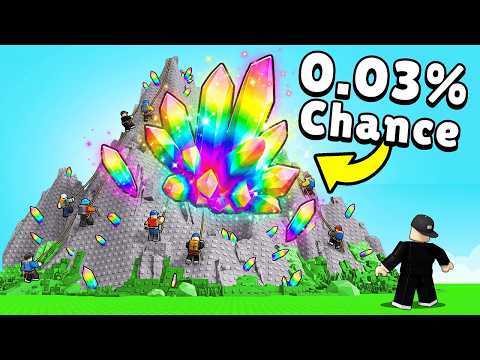 Official mediaLooking to join the Mine a Mountain Discord? Learn how to connect with the community, stay updated on game events, and master this popular Roblox simula...YouTube
 Connecting with the Mine a Mountain Community
If you are obsessed with climbing to the peak and gathering rare crystals, you know that finding the official mine a mountain discord is the best way to level up your gameplay. Engaging with the developers and fellow players through the mine a mountain discord allows you to stay ahead of the curve, learn about upcoming updates, and participate in community events that can give you a competitive edge.
Roblox simulators like Mine a Mountain thrive on active player bases. By joining the social hubs associated with the game, you gain access to tips, trading strategies, and direct communication with the creators. This guide will walk you through why these community channels are essential for your progression and how you can optimize your time in the game.
Why Join the Official Community Channels?
In a game where a new mountain appears every single hour, staying informed is the difference between success and failure. Community platforms serve as the central nervous system for the game’s meta. Whether you are looking to trade rare items or simply want to know when the next big event drops, the social community is where the action happens.
Benefits of Joining the Community
| Benefit | Description | Impact on Gameplay |
|---|---|---|
| Update Alerts | Real-time notifications on patches | Stay ahead of new mechanics |
| Event Scheduling | Advanced notice for admin events | Never miss limited-time rewards |
| Trading Hubs | Connect with players for trades | Complete your collection faster |
| Strategy Sharing | Access to top-tier digging tips | Maximize your crystal yield |
Understanding the Gameplay Loop
Mine a Mountain is an incremental simulator that rewards patience and strategic upgrades. To succeed, you must balance your warmth, your pickaxe efficiency, and your backpack capacity. According to official Roblox game data, the game has seen over 117 million visits, making it a highly competitive environment.
Essential Progression Metrics
To reach the top of the mountain without freezing, you need to manage your resources carefully. Use the table below to understand the core pillars of your progression:
| Feature | Function | Recommendation |
|---|---|---|
| Warmth | Prevents freezing at high altitudes | Upgrade this first for deep dives |
| Pickaxe | Mining speed and efficiency | Prioritize for faster crystal collection |
| Backpack | Storage capacity for crystals | Upgrade when inventory fills too quickly |
| Digging Luck | Chance for rare crystal drops | Join the group for a +1 bonus |
Tips for New Players
If you are just starting your journey, the sheer volume of content can be overwhelming. Community reports suggest that new players often neglect their warmth stat, which is a fatal mistake once you reach the colder, higher altitudes of the mountain.
Quick-Start Strategy Guide
- Focus on Early Gains: Spend your initial cash on basic pickaxe upgrades to speed up your early-game cycle.
- Don't Ignore the Group: Joining the official Roblox group is a free way to gain a permanent +1 Digging Luck bonus.
- Monitor the Clock: Since the mountain resets every hour, plan your long mining sessions accordingly to avoid losing progress mid-climb.
- Stay Social: Use the mine a mountain discord or the game's social features to find partners who can help you reach higher peaks faster.
Navigating Admin Events and Updates
The developers of Mine a Mountain frequently host events that introduce chaos and rewards. Community reports indicate that "Admin Abuse" events and major content updates are the most anticipated times for the player base.
Upcoming Event Schedule
| Event Type | Typical Timing | What to Expect |
|---|---|---|
| Admin Abuse | Weekend afternoons | Unexpected gameplay modifiers |
| New Mountain | Hourly | Fresh crystals and resource spawns |
| Major Updates | Periodic Fridays | New tools, zones, or mechanics |
By participating in these events, you often gain access to exclusive content that isn't available during standard gameplay. Always check the official announcement channels to see if there are specific requirements for these events, such as reaching a certain level or owning a specific piece of gear.
Staying Safe While Mining
While the community is generally welcoming, it is important to remember that Mine a Mountain has strict rules against exploiting and cheating. The developers have a zero-tolerance policy; using unauthorized software will result in a permanent ban.
Player experience highlights that the best way to enjoy the game is to engage with the community honestly. If you see someone behaving suspiciously, use the "Report Abuse" feature within the Roblox interface rather than engaging in arguments in the chat. Keeping the community clean ensures that the game remains fun for everyone.
Frequently Asked Questions
Is there an official Mine a Mountain Discord server?
Yes, most popular Roblox titles maintain a presence on Discord. You can usually find the link on the game’s official Roblox page or by asking experienced players in the in-game chat to point you toward the correct mine a mountain discord invite link.
How do I get more Digging Luck?
You can increase your luck by joining the official game group on Roblox. This is a common strategy discussed in the mine a mountain discord that provides a consistent +1 bonus to your digging efficiency.
What happens when the mountain resets?
The game features a mechanic where a new mountain generates every hour. This keeps the gameplay fresh and prevents the economy from becoming stagnant, as rare crystals are redistributed throughout the new terrain.
Can I play on mobile?
Yes, the game is fully compatible with mobile devices. If you have trouble joining the mine a mountain discord while using a phone, ensure your Discord app is updated and that you have verified your account to bypass server security settings.
Related Guides
Finding the Best Mine a Mountain Reddit Discussions: Tips and Community Guides
Looking for Mine a Mountain Reddit tips? We explore the best community resources, strategies for mining success, and how to master this popular Roblox g...
Is There an Official Mine a Mountain Trello Board? Your Ultimate Game Resource Guide
Looking for a Mine a Mountain Trello board to track updates? Discover the best resources for mining, pickaxe upgrades, and community-driven gameplay tips.